On this page
Quick answer
The Astral has an air inlet filter on the back, a circuit adapter that matches your breathing circuit, and the circuit itself, often with a bacterial filter. It runs on wall power, a built-in battery and optional external batteries. Your supplier and clinician choose your parts.
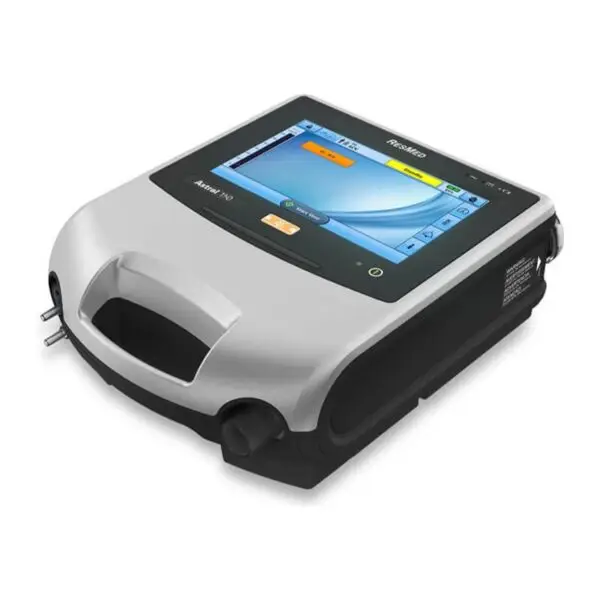
This guide explains the supplies used with a ResMed Astral home ventilator. It is based on ResMed’s Astral user guide and parts lists. It does not cover settings. Your clinician and supplier decide those.
Which Astral do you have?
One ResMed user guide covers both the Astral 100 and the Astral 150. Two differences matter for supplies:
- Only the Astral 150 takes a double limb circuit.
- The Astral 150 has a built-in oxygen (FiO2) sensor. On the Astral 100 it is an optional extra.
To see your model and serial number on the screen, open the Information menu and choose Device. Write both down. Your supplier may ask for them.
The parts, one by one
Air inlet filter
The air inlet on the back of the Astral holds a hypoallergenic filter. It cleans the room air the ventilator pulls in. ResMed sells it as the inlet filter 4-pack, part 27939.
ResMed’s user guide says to:
- Check the filter once a month for dirt or dust.
- Replace it every 6 months, or more often in a dusty home.
- Never wash it. It is not washable or reusable.
Your supplier may give you a different schedule. Follow theirs.
Changing the air inlet filter
First turn off the Astral. Unplug it from the wall and from any external battery. Then follow the user guide’s steps in order:
- Turn the air filter cover counterclockwise to unlock it.
- Pull the cover off the device.
- Pull the old filter out of the cover and throw it away.
- Put a new filter into the cover.
- Put the filter and cover back into the device.
- Turn the cover clockwise to lock it in place.
Keep the space around the Astral clear, so nothing blocks the air inlet.
Circuit adapter
The circuit adapter sits under a cover on the Astral. It has to match the type of circuit you use. ResMed makes three:
| Adapter | Used with | ResMed part |
|---|---|---|
| Single limb leak adapter | Leak circuits and mouthpiece circuits | 27942 |
| Single limb valve adapter | A single limb circuit with a breathing-out (expiratory) valve | 27941 |
| Double limb adapter | Double limb circuits (Astral 150 only) | 27940 |
The user guide says to check the adapter every week for moisture or dirt. Replace it when needed, or at least every 6 months. It also says to use adapters and circuits only as your clinician directs.
Patient circuit
The patient circuit is the tubing that carries air from the Astral to you. ResMed lists these kinds:
- Single limb leak circuit. Air leaves on purpose through a vented mask, or through a ResMed leak valve placed close to you.
- Single limb circuit with an expiratory valve. ResMed’s own version is the Astral Quick Connect single limb circuit.
- Double limb circuit (Astral 150 only). The breathing-out valve is in the double limb adapter.
- Mouthpiece circuit. A single limb circuit with no valve and no intentional leak.
Circuits come in different widths and lengths, with or without a water trap or a heated wire. Ask your supplier for the exact part number you use.
The Astral user guide says to follow the circuit maker’s instructions for cleaning and replacing it. It gives no change schedule of its own, so your supplier sets one.
After any change to the circuit, the user guide says to run a Learn Circuit test. That includes adding or removing an accessory, such as a filter. The test is done with the circuit off of you, so have backup ventilation ready if you need it. Your supplier or clinician can show you how.
Bacterial filter
ResMed calls it an antibacterial filter (part 24966). It fits on the port where air leaves the Astral toward you. It helps protect against germs passing between the machine and the circuit.
Check it often for moisture or dirt, especially when you use a humidifier or nebulizer. Replace it as the filter’s maker says.
Humidifier or HME
The user guide recommends a humidifier or an HME (heat and moisture exchanger). With a trach (invasive ventilation), humidified air is required.
- Don’t use an HME and a heated humidifier at the same time.
- Keep the humidifier on a level surface, lower than the Astral and lower than you.
- Empty and dry the water tub before you move the humidifier.
The Astral guide does not name a humidifier model. Clean it as its own user guide says.
Oxygen connection
If you use oxygen, it connects only at the oxygen inlet on the back of the Astral. Don’t add it anywhere else in the circuit. Turn the oxygen off when the Astral isn’t ventilating.
Your clinician sets your oxygen. Don’t change it on your own.
Power cord and batteries
- Power supply and cord. Keep the cord away from hot surfaces. Never put it in water. Unplug it by holding the plug, not by pulling the cord.
- Internal battery. It is built in, and the user guide says it is not a main power source. With a new battery in typical home use, ResMed lists about 8 hours. In harder conditions, it lists just over 4 hours. It charges whenever the Astral is plugged in, in about 4 hours from empty.
- Astral External Battery (part 27919). It adds up to about 8 hours per battery in typical use, and often less. You can connect up to two. It charges only from the Astral 90W power supply.
- Astral DC adapter (part 27925). It runs the Astral from a 12–24 V vehicle socket. ResMed says to start the car before you plug in the Astral.
The user guide says anyone who depends on the ventilator should always have an external power source on hand. It also says not to power the Astral from a power wheelchair’s battery.
Run time drops with battery age, temperature, settings and leaks. Once a month, the user guide says to run the Astral on its internal battery for at least 10 minutes and check the remaining charge. Then plug it back in.
Bags and remote alarm
- Astral Carry Bag (27945): for carrying only. Don’t run the Astral inside it.
- Astral Mobility Bag (27917) or SlimFit Mobility Bag (27949): for running it on the go.
- Remote Alarm II (27903): repeats the Astral’s alarms in another room. It runs on two AA batteries and is not for use on a wheelchair.
For outages and trips, see our home ventilator power outage and travel plan.
What your supplier and clinician decide
- Which circuit, adapter and filters you use.
- Your settings, oxygen and alarm limits.
- How often the circuit and filters get changed.
- Repairs and servicing. Don’t open or repair the Astral yourself.
Don’t change your machine’s settings on your own. Ask your supplier.
Questions to ask your supplier
- Which circuit and adapter do I use, and what are their part numbers?
- How often should I change the circuit, filters and water chamber?
- Can you show me how to run Learn Circuit?
- When was my internal battery last checked?
- Who do I call at night or on weekends?
Keep track of it
DuradMedical members can use Supply Reminders. You add your machine and mask, enter when you last replaced each part (using your supplier’s schedule), and we email you before each part is due. Then you can order it here, or from your own supplier.
When to call your supplier
Call the company that supplied your ventilator if:
- The Astral was dropped, makes unusual sounds, or works differently than usual. The user guide says to stop using it and contact your provider. If you depend on the ventilator, switch to your backup first.
- An alarm keeps coming back. The user guide says to switch to your backup ventilator and have the Astral serviced.
- No alarm sounds when you turn the Astral on. The user guide says not to use it.
- A Learn Circuit test fails.
- An external battery is damaged or won’t charge.
- You’re not sure which part fits.
The user guide also says that people who depend on the ventilator should always have a backup ready, such as a backup ventilator or a manual resuscitator bag.
Sources
- ResMed. Astral 100 / Astral 150 User Guide (278626/1, 2022-04, Americas edition). https://document.resmed.com/documents/products/machine/astral-series/user-guide/astral-100-150_user-guide_amer_mul.pdf
- ResMed. Astral Accessories Compatibility List (10110142/4, 2022-03). https://document.resmed.com/documents/products/machine/astral-series/accessories-compatibility-list/astral_accessories-compatibility-list_glo_eng.pdf
- ResMed. Astral Components Card (1017059/4, 2018-03, Americas edition). https://document.resmed.com/documents/products/machine/astral-series/components-card/1017059_astral_component-card_amer_eng.pdf
- ResMed. Astral External Battery User Guide (278699/1, 2024-09). https://document.resmed.com/documents/products/accessory/astral-external-battery/user-guide/278699_astral-external-battery_user-guide_row_multi.pdf
- ResMed. Astral DC/DC Adapter User Guide (278653/1, 2022-06). https://document.resmed.com/documents/products/accessory/astral-dc-dc-adapter/astral-dc-adapter_user-guide_glo_mul.pdf
- ResMed. Mobility Bag / SlimFit Mobility Bag User Guide (278654/2, 2023-03). https://document.resmed.com/documents/products/accessory/astral-mobility-bag/user-guide/278654_astral-mobility-bag-slimfit-mobility-bag_user-guide_glo_multi.pdf
- ResMed. Remote Alarm II User Guide (278632/1, 2021-01, Americas edition). https://document.resmed.com/documents/products/accessory/remote-alarm-ii/user-guide/remote-alarm-ii_user-guide_amer_eng.pdf