On this page
Quick answer
The Trilogy 100 and 200 use a gray foam air inlet filter. The Trilogy Evo uses a foam filter plus a particulate filter. Each needs a circuit with the right exhalation port or valve, often a bacterial filter, and batteries. Your supplier chooses your parts.
This guide explains the supplies used with Philips Trilogy home ventilators. It is based on Philips’ accessory guides and instructions. We couldn’t find Philips’ full Trilogy user manuals on Philips’ public website when we wrote this. Your supplier can give you the manual for your model.
It does not cover settings. Your clinician and supplier decide those.
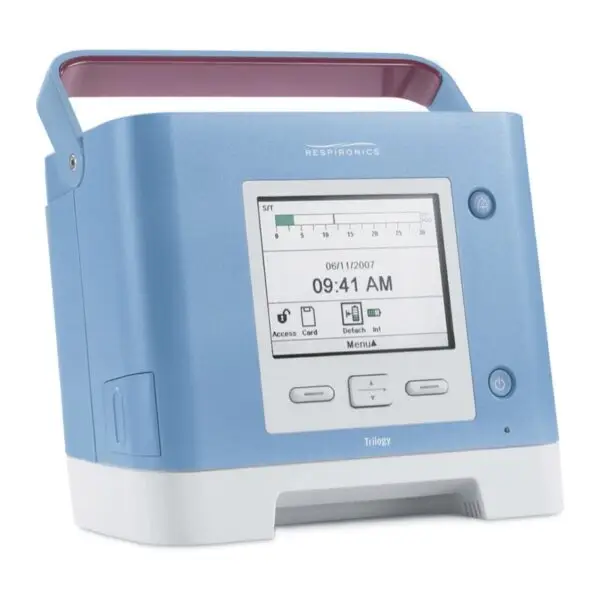
Which Trilogy do you have?
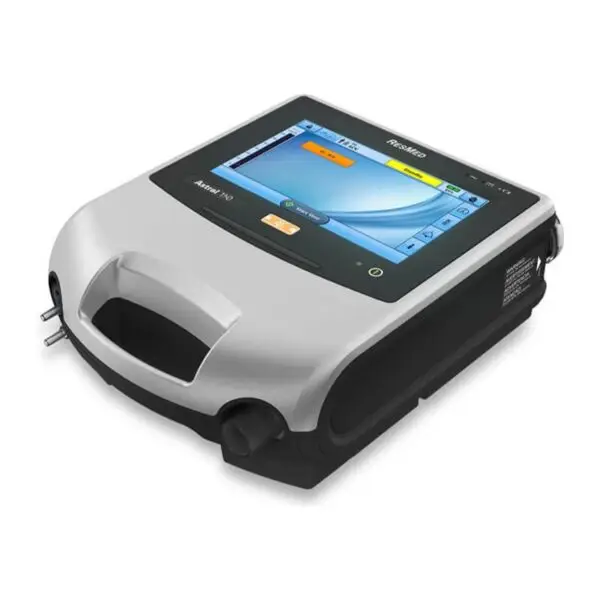
- Trilogy 100 and Trilogy 200. The older models. The Trilogy 200 works with three circuit types: passive, active PAP and active flow. A few parts, such as the proximal flow sensor, are for the Trilogy 200 only.
- Trilogy Evo. The newer model. Philips says it will keep servicing and supporting the Trilogy Evo through January 31, 2031.
Not sure which one you have? Ask your supplier. They can also tell you the serial number.
Filters
Trilogy 100 and 200: gray foam filter
A gray foam filter sits in the air inlet. It keeps dust out of the air the ventilator pulls in. Philips part: 1029330 (2-pack).
Philips’ steps and schedule for cleaning and replacing it are in your Trilogy user manual. Ask your supplier for a copy, and follow the schedule they give you.
Trilogy Evo: foam filter and particulate filter
The Trilogy Evo has two filters on the air path:
- Air inlet foam filter. Philips part: 1134591 (10-pack).
- Particulate filter. A second filter that keeps dirt and dust out of the machine. Philips made it a required part for the Evo in a 2024 notice.
Philips’ instructions for the particulate filter say to:
- Look it over before use for damage or wear, and replace it if needed.
- Replace it at least once a month at home, and between patients. Ask your supplier who should change it.
Philips lists the particulate filter as part 1134430 in its accessory guide. Its newer filter instructions list 1156479 (single) and 1156480 (10-pack). Ask your supplier which one you get.
Bacterial filter
A single-use bacterial filter can go in the breathing circuit. Philips’ Trilogy 200 quick start guide shows it as optional on each circuit type, so your supplier decides if you use one.
Philips parts include C06418 (22 mm bacteria filter, 50-pack) for Trilogy 100 and 200, and 1147018 (bacterial/viral filter, 10-pack) for the Evo.
Circuits and exhalation parts
The circuit is the tubing that carries air from the ventilator to you. What matters most is how your breath gets out. Trilogy circuits do this in different ways:
| Circuit type | How breath gets out | Philips parts you may see |
|---|---|---|
| Passive | Through a leak port that’s always open | Whisper Swivel II (332113, reusable); disposable exhalation port (312149); Trilogy 100/200 passive circuit (1069467); Evo passive circuit with swivel (1132339 or 1132340) |
| Active (exhalation valve) | Through a valve that opens when you breathe out | Active exhalation valve with PAP (1065659) for Trilogy 100/200; Evo active circuit with disposable valve (1132343 or 1132344) |
| Active flow | Through a valve, with a flow sensor near you | Proximal flow sensor (1050408) for Trilogy 200; electronic flow sensors for the Evo |
| Dual limb (Evo) | Through a separate tube for breathing out | Evo dual limb circuit (1127307 or 1127306); Dual Limb AEV (1139436) |
On the Trilogy 100 and 200, a swappable exhalation port block on the ventilator matches the circuit type. Philips makes passive (1040372) and active (1054670) blocks. A universal block (1040370) is listed for the Trilogy 200.
Philips sells both disposable and reusable circuits. Cleaning steps for reusable circuits are in your user manual. Your supplier sets how often the circuit gets changed.
Humidifier and HME
Philips’ Trilogy Evo accessory guide lists Fisher & Paykel heated circuits made for F&P humidifiers, including the MR850 and HC550. For the Trilogy 100 and 200, Philips’ Trilogy accessory guide lists a single-use auto-feed humidification chamber (22104) and Airlife HMEs (heat and moisture exchangers).
Philips’ addendum for the Trilogy 100 and 200 says a humidifier used with them must meet ISO standards. Your supplier chooses the humidifier and chamber.
Batteries and power
Trilogy 100 and 200
Besides wall power, the Trilogy 100 and 200 can run on three kinds of battery:
- Internal battery. Built in.
- Detachable battery (1043570). Easy to swap. Philips says a fully charged one gives at least 3 hours under normal use.
- External battery. It connects by cable. Philips’ Respiratory Li-ion battery kit gives more than 8 hours under Philips’ test conditions, and recharges in about 3 hours.
Philips also lists an automotive DC power adapter (1067424) for the Trilogy 100 and 200.
If wall power is lost, the Trilogy switches to a battery and keeps running. It sounds an AC Power Disconnected alarm. When about 20 minutes of battery time is left, a Low Battery alarm sounds. Philips’ advice for that alarm: switch to another battery, or plug into wall power and recharge.
Trilogy Evo
- Detachable battery (1127889). It slides in and can be swapped while the ventilator runs. Philips says a fully charged one gives at least 7.5 hours under normal use, in Philips’ test.
- Charging. The Evo recharges the battery whenever it’s on wall power or an approved DC source.
- Checking the charge. Press the button under the battery’s lights. Five lights means 81–100%.
- Swapping it. Open the battery door, lift the handle and pull the battery out. Slide the new one in until it clicks, then close the door.
- Cleaning it. Philips says to clean the battery monthly with a damp (not dripping) cloth and mild dish soap. Wipe it with clear water and let it air dry. Never put it in water.
- Car or DC power. Philips lists 12/24 V battery cables for the Evo (1127401 and 1127402).
Real battery time depends on settings, charge level and battery age. Use only Philips batteries, chargers and accessories.
Bags, stands and remote alarm
- Trilogy 100 and 200: travel carrying case (1033709), in-use carrying case (1040420) and roll stand (1047410).
- Trilogy Evo: in-use case (1133930), travel bag (1134428), wheelchair mounting kit (1134633) and roll stand (1134429).
- Remote alarm (1118941): repeats the ventilator’s alarms in another room. It fits all three models.
For outages and trips, see our home ventilator power outage and travel plan.
What your supplier and clinician decide
- Which circuit, exhalation port and filters you use.
- Your settings, oxygen and alarms.
- How often the circuit and filters get changed.
- Repairs, servicing and any Philips device updates.
Don’t change your machine’s settings on your own. Ask your supplier.
Questions to ask your supplier
- Which Trilogy do I have, and can I get its user manual?
- Which circuit and exhalation port do I use, and what are the part numbers?
- How often should I clean or change the filters and circuit?
- How long do my batteries really last?
- Who do I call at night or on weekends?
Keep track of it
DuradMedical members can use Supply Reminders. You add your machine and mask, enter when you last replaced each part (using your supplier’s schedule), and we email you before each part is due. Then you can order it here, or from your own supplier.
When to call your supplier
Call the company that supplied your ventilator if:
- An alarm keeps coming back. Philips’ addendum says to switch to another way of ventilating and contact your health care professional.
- Another electronic device nearby seems to affect your Trilogy 100 or 200. Philips says to move the ventilator away from it. If it still doesn’t work right, use your backup and call your home care provider.
- A Trilogy Evo detachable battery was dropped or handled roughly. Philips says to stop using that battery.
- A battery won’t charge or runs out early.
- You’re not sure which part fits.
- You have questions about a Philips notice for your Trilogy. Philips says device fixes go through your equipment supplier.
Sources
- Philips Respironics. Trilogy Accessory Guide (1153629 R01, 2023, U.S. English). https://www.documents.philips.com/assets/Instruction%20for%20Use/20230816/1fb95d1f07514ca2a709b060014769c5.pdf?feed=ifu_docs_feed
- Philips Respironics. Trilogy Instructions for Use Addendum (1134834 R03, U.S. edition). https://www.documents.philips.com/assets/Instruction%20for%20Use/20220805/a053a3aa85c14133b6feaee800fe7642.pdf?feed=ifu_docs_feed
- Philips Respironics. Trilogy200 Quick Start Guide (1068897). https://www.documents.philips.com/doclib/enc/9968902/T200QuickStartGuide.pdf
- Philips Respironics. Accessory Guide, Trilogy Evo (1143741 R05). https://www.documents.philips.com/assets/20191022/994bbcf2b9bd45de8f1baaee00dfa0da.pdf
- Philips Respironics. Particulate Filter, Instructions for Use (1156783). https://www.documents.philips.com/assets/Instruction%20for%20Use/20250801/71a8782966774d5fb340b32c010a991c.pdf?feed=ifu_docs_feed
- Philips Respironics. Detachable Battery Pack, Instructions for Use (1128215 R04). https://www.documents.philips.com/assets/Instruction%20for%20Use/20210722/6ac59b34cac7487499c3ad6d011d4b70.pdf?feed=ifu_docs_feed
- Philips. Ventilation news and updates (U.S.). https://www.usa.philips.com/sleep-respiratory-care/news/business-update/ventilation-news-and-updates
- Philips Respironics. Urgent Medical Device Correction, Update: Trilogy Evo, Trilogy Evo O2, Trilogy Evo Universal and Trilogy EV300 (U.S., July 3, 2024). https://www.philips.com/c-dam/b2bhc/master/resource-catalog/landing/experience/breathing-and-respiratory-care/trilogy-mdc/trilogy-evo-ev300-update-us-20240703.pdf