On this page
Quick answer
TSA allows CPAPs in carry-on and checked bags. At screening, an officer may ask you to take yours out of your carry-on. Empty the water tub before you pack, bring the right power cord for where you’re going, and ask your airline before using it on board.
This guide covers TSA screening, a packing list, and what ResMed’s AirSense 11 and AirMini user guides say about travel. If you use another machine, follow its own user guide. To check your model first, see How to find your machine and mask model name.
Getting through airport security
TSA lists CPAPs, BiPAPs and APAPs as allowed in both carry-on and checked bags. Here is what its screening page says:
- In standard lanes, your machine, mask and tubing may stay in their carrying case for X-ray. An officer may still ask you to take them out of your carry-on.
- In TSA PreCheck lanes, they may stay in the case and in your carry-on bag.
- The TSA officer makes the final call on whether an item goes through the checkpoint.
You can tell the officer about your medical condition out loud, with a TSA Notification Card, or with medical documents.
Want help at the checkpoint?
Contact TSA Cares at least 72 hours before your flight. Call (855) 787-2227, or use the TSA Cares form on the TSA website. You can ask for a Passenger Support Specialist to help you through screening, but you will still be screened.
CPAP packing checklist
Use this list the night before you leave. For more on each part, see our CPAP and BiPAP guides.
- Travel bag. The AirSense 11 comes with one. ResMed says to use it to protect the machine.
- Machine, power supply and power cord. Check the cords and power supply for damage or wear first. ResMed says to stop using a damaged one and replace it.
- A power cord that works where you’re going. See “Power and voltage” below.
- Mask, headgear and tubing. Clean and dry them the way their user guides say before you pack them. See How to clean CPAP tubing (and dry it).
- Water tub, empty. The AirSense 11 guide says to empty the tub and pack it separately in the travel bag.
- Side cover (AirSense 11, optional). ResMed lists a side cover that lets you use the machine without the water tub.
- HumidX or HumidX Plus (AirMini). Keep them in a clean, dry place.
- Spare parts for a longer trip, such as filters or a cushion. See How often should you replace CPAP supplies?
- Your user guide, printed or saved on your phone, and your supplier’s phone number.
- Optional papers. A TSA Notification Card, and the air travel letter ResMed’s guides say you can download and print from ResMed.com.
Water and your humidifier
Don’t travel with water in the tub. The AirSense 11 guide says to make sure the tub is empty before you transport the machine.
Caution: Don’t use the AirSense 11 with water in the tub while in transit, such as on a plane or in a vehicle. ResMed’s guide says water could spill into the machine. You could also breathe it in during turbulence.
When you arrive, fill the tub the way your user guide says. For the AirSense 11, the HumidAir 11 Standard tub takes distilled water only. The HumidAir 11 Cleanable tub takes drinking-quality water.
Don’t add anything to the water, such as scented oils or perfumes. TSA’s CPAP screening page gives a liquids exemption for nebulizer liquids, but it doesn’t mention CPAP water. Before you pack the tub, clean and dry it the way your user guide says. See How to clean your CPAP water chamber.
Power and voltage
The AirSense 11 and AirMini guides list an input range of 100–240V, 50–60Hz for their power supplies. Check the label on your own power supply before you plug in.
Both guides say to make sure you have the right power cord (AirSense 11) or power supply (AirMini) for the region you’re traveling to. For information on buying one, they say to contact your care provider.
- Don’t plug a USB cable into the AirSense 11, and don’t try to plug its power adapter into a USB device. ResMed says this may damage the machine or the USB device.
- Using a battery? TSA says devices with lithium metal or lithium-ion batteries should go in your carry-on bag.
- Heading to the mountains? The guides list an operating altitude of up to 9,870 feet for the AirSense 11 and 8,500 feet for the AirMini. If you’ll be higher, ask your supplier before you go.
Using your CPAP on the plane
First, ask your airline about its rules for medical equipment on board. ResMed’s guides say you can use the AirSense 11 and the AirMini on a plane.
AirSense 11
- Make sure the water tub is empty and in place. The machine won’t work without the tub or the side cover inserted.
- Turn on Airplane Mode when airline staff ask. From the Home screen, tap MORE, swipe to Airplane Mode, and tap it.
AirMini
- While it’s plugged in, hold the Bluetooth button for at least 10 seconds, until the light is white. This turns on airplane mode.
- Don’t use the AirMini app on the plane. Use the Start/Stop button on the machine instead.
- To reconnect Bluetooth later, press the Bluetooth button.
The AirMini as a travel machine
ResMed’s AirMini guide says you can take it with you wherever you go. It weighs 10.6 oz (300 g) and measures 5.4 x 3.3 x 2.1 inches.
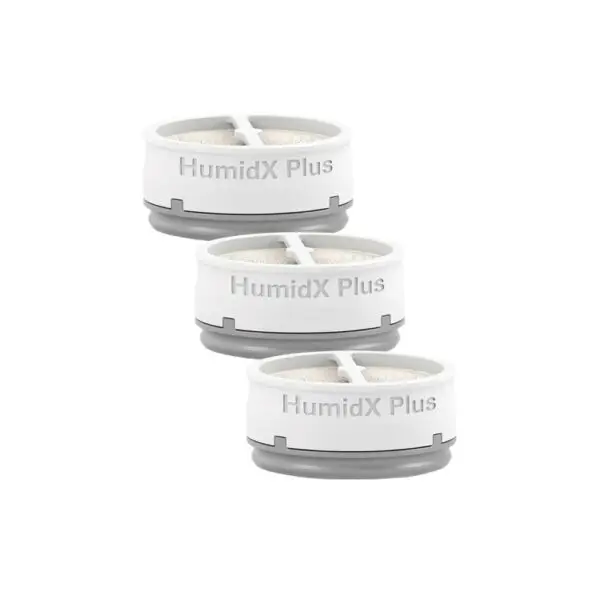
For humidification, the AirMini can use a HumidX or HumidX Plus. ResMed calls these waterless humidifiers. Its guide says the HumidX Plus is useful when the air is very dry, such as at high altitudes or on a plane.
- They work only with some AirMini mask setups. Your AirMini guide lists which ones.
- Check the HumidX every day for damage, or for blockages from dirt or dust.
- It can’t be washed. Store it in a clean, dry place when you’re not using it.
- It should be dry when you start your machine. If it’s wet, replace it.
- Your AirMini guide says how soon to replace it after you open the pack, so bring enough for your trip.
We carry AirMini filters, tubing and HumidX packs in Travel CPAP supplies.
Getting a dry nose? ResMed’s AirMini guide says to check your mask fit first, then try the HumidX Plus if the seal is good. If it keeps happening, ask your supplier about fit, and your doctor about your nose.
Keep track of it
A trip is a good time to check which parts are due. If your supplier’s schedule says a part is due, pack a new one.
DuradMedical members can use Supply Reminders. You add your machine and mask, enter when you last replaced each part (using your supplier’s schedule), and we email you before each part is due. Then you can order it here, or from your own supplier. See how membership works
When to call your supplier
Call the company that supplied your equipment if:
- You need a power cord or power supply for another country.
- A power cord, cable or power supply looks damaged or worn.
- Your machine was damaged on the trip, or doesn’t work the way it usually does. ResMed’s guides say to stop using it, contact your care provider, and not try to open it.
- You plan to stay higher than the operating altitude in your user guide.
- You’re not sure which spare parts fit your machine and mask.
- Dryness or leaks keep happening while you’re away. Don’t change your machine’s settings on your own. Ask your supplier.
- You want a travel machine and have insurance questions. Your supplier can tell you what your plan needs.
For questions about your health or breathing, ask your doctor.
Common questions
Does my CPAP count toward my carry-on limit?
ResMed’s AirSense 11 guide says medical devices don’t count toward your carry-on limit. ResMed’s AirMini guide says this is true for some airlines. Check with your airline about its policy.
Can I put my CPAP in a checked bag?
Yes. TSA allows CPAPs in checked bags as well as carry-on bags. ResMed’s AirSense 11 guide says the machine may be taken on board as carry-on luggage.
Parts for this guide
Check the label on your current part, or your user guide, before you order.
-
Travel CPAP supplies ResMed
ResMed AirMini HumidX Plus, 6-Pack
$69.99Member price $64.99 How membership works Add to cart -
Travel CPAP supplies ResMed
ResMed AirMini HumidX, 3-Pack
$48.99Member price $43.99 How membership works Add to cart -
Travel CPAP supplies ResMed
ResMed AirMini Filters, 12-Pack
$56.99Member price $51.99 How membership works Add to cart


Sources
- Transportation Security Administration. Nebulizers, CPAPs, BiPAPs and APAPs (What Can I Bring?). https://www.tsa.gov/travel/security-screening/whatcanibring/items/nebulizers-cpaps-bipaps-and-apaps
- Transportation Security Administration. Passenger Support (TSA Cares). https://www.tsa.gov/travel/passenger-support
- Transportation Security Administration. Disabilities and Medical Conditions. https://www.tsa.gov/travel/tsa-cares/disabilities-and-medical-conditions
- ResMed. AirSense 11 User Guide (Americas edition, 398133/2, English section). https://document.resmed.com/documents/products/machine/airsense-11/user-guide/airsense11_user-guide_amer_mul.pdf
- ResMed. AirMini User Guide (Americas edition, 388138/1, English section). https://document.resmed.com/documents/products/machine/airmini/user-guide/airmini_user-guide_amer_eng.pdf